


RabbitGUI - Debug and manage RabbitMQ effortlessly
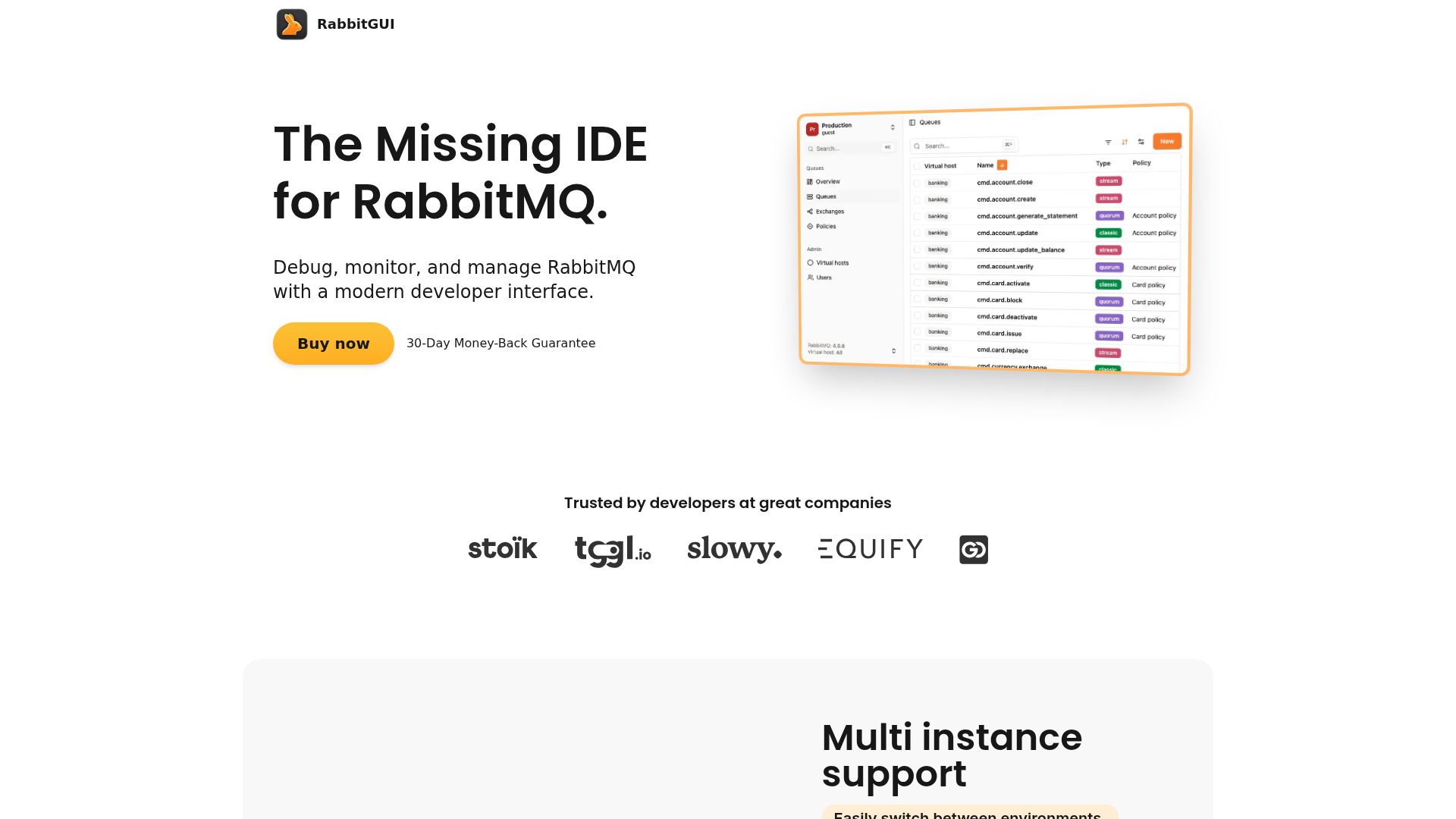
"Ever wished debugging RabbitMQ could feel as smooth as VS Code? Meet RabbitGUI – the modern IDE that's about to change how you interact with message queues forever."
The RabbitMQ Management Problem We All Face
Let's be honest - working with RabbitMQ's native tools feels like using Notepad when you're used to VS Code. The CLI tools work, but they're clunky. The management plugin? Better, but still feels like it's stuck in 2010.
That's where RabbitGUI comes in - it's the modern developer experience RabbitMQ desperately needed but never had. Think of it as your Swiss Army knife for everything RabbitMQ.
Why RabbitGUI Changes Everything
🚀 Multi-Instance Support Without the Headache
- Manage local, staging, AND production instances from one window
- No more reconfiguring connections when switching environments
- All credentials stored securely on your local machine
🔍 Search That Actually Works
Finding queues in large environments? Normally like finding a needle in a haystack. With RabbitGUI:
- Blazing fast local-first search
- Covers queues, exchanges, policies, vhosts - everything
- Keyboard shortcuts for power users
✨ VS Code-Like JSON Editing
The built-in JSON editor makes message inspection and crafting actually pleasant:
- Full-featured editor with syntax highlighting
- Routing key autocompletion
- Error detection before you publish
📊 Time Series That Tell The Story
Queue metrics should be insightful, not confusing. RabbitGUI's time series explorer:
- Interactive zooming (just drag to focus)
- Automatic detail adjustment
- Hover for exact values
Pro Features You Didn't Know You Needed
Binding Visualization That Makes Sense
Finally understand your routing topology with:
- Dead-letter exchanges visualized alongside regular bindings
- One-click navigation between related components
- Alternate exchange tracking
Custom Views For Your Workflow
Create saved views with:
- Advanced filtering
- Customizable columns
- Persistent layouts for different tasks
Built-In Docs That Save Trips to Google
Integrated RabbitMQ documentation means:
- Human-friendly input forms
- No more memorizing obscure arguments
- Contextual help where you need it
The RabbitGUI Difference
While other tools force you to cobble together solutions from:
- CLI tools
- Management plugin
- External JSON editors
- Monitoring dashboards
RabbitGUI brings it all together in one polished interface that actually understands developer workflows.
Simple Pricing That Makes Sense
- 29€ one-time payment (no subscriptions)
- All features included
- 1 year of free updates
- 30-day money-back guarantee
Pro Tip: Early adopters get 50% off at launch - worth keeping an eye on their website if you're interested.
Who This Is For
RabbitGUI shines for:
- Developers tired of RabbitMQ's clunky tools
- Teams managing multiple environments
- Anyone debugging complex routing scenarios
- Engineers who value their time
The Bottom Line
If you work with RabbitMQ regularly, RabbitGUI isn't just nice-to-have - it's a productivity game changer. It takes the friction out of message queue management so you can focus on what matters - building great systems.
Ready to upgrade your RabbitMQ experience? Check out RabbitGUI's website to learn more about their upcoming launch.
Features
Multi instance support
Manage local, staging, and production RabbitMQ instances from a single interface.
Quick search
Powerful, blazing-fast search to locate queues, exchanges, policies, or virtual hosts instantly.
JSON editor
Built-in, fully-fledged JSON editor for inspecting, modifying, and crafting messages.
Time series explorer
Real-time interactive charts to visualize and understand queue behavior.
Bindings management
Visualize, navigate, and manage bindings, including dead-letter and alternate exchanges.
Traffic(2025-07)
Monthly Traffic
Traffic Source
Top Keywords
| Keyword | Traffic | Volume | CPC |
|---|---|---|---|
| rabbitmq ui | 0 | 400 | - |
| rabbitmq max message size | 0 | 170 | - |
| rabbit mq ui | 0 | 150 | - |
| rabbitmq username and password | 0 | 130 | - |
| rabbitmq username password default | 0 | 130 | - |
Source Region
Whois
| Domain | rabbitgui.com |
| Creation Date | 2026-04-21 06:47:41 |
| Last Updated | 2025-04-26 20:36:00 |
| Domain Status | clienttransferprohibited, //icann.org/epp |
| Registrar | NameCheap, Inc. |
| Registrar IANA ID | 1068 |
| Registrar URL | http://www.namecheap.com |
Featured Products

Groq

Wegic

Pinecone

Vapi

RunPod

Andi

CodeGPT

Perplexity AI
Related Categories
Copy embed code
Alternative Products


Sopa


DNSRedo


Toolbit AI


Website Screenshot Online


MCP Explorer

Dev Docs Translation for Apple


CustomGpt
Groq

