


Magic ToDo - Simplify your task management effortlessly
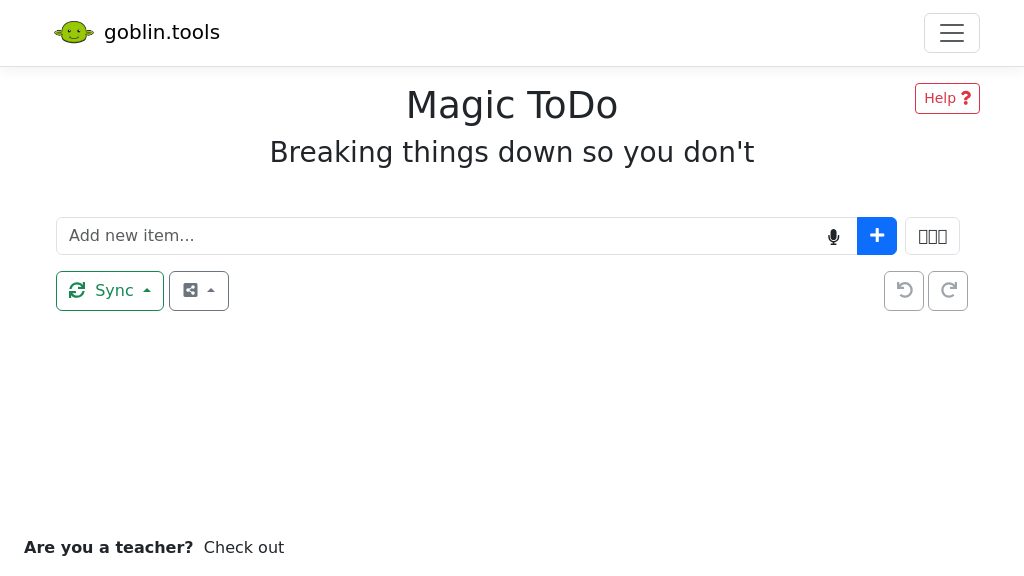
Magic ToDo operates on a simple yet effective task management paradigm. The primary function is to allow users to create, manage, and categorize their tasks based on individual preferences and requirements. Here's how it works:
-
Task Creation: Users can easily add tasks to their list with a simple interface. Each task can have a title, description, and a spiciness level.
-
Spiciness Level: This unique feature allows users to indicate how stressful or complex they find a task. By selecting a spiciness level from 1 to 6, the tool intelligently breaks down the task into smaller, manageable steps.
-
Categorization: Magic ToDo automatically assigns categories to tasks using emojis. This visual representation makes it easier for users to identify the nature of each task at a glance.
-
Filtering: Users can filter their tasks based on categories, hiding completed items to maintain focus on what needs to be done.
-
Task Management Tools: Each task comes with a set of common tools such as edit, remove, and add subtask options. Users can also reorder tasks by dragging the icon on the left side.
-
Synchronization: Magic ToDo offers cloud synchronization where users can log in with a unique username and password. This ensures that their task list is updated across all devices securely. The tasks are encrypted on the user's device, ensuring privacy and security.
-
Export Options: To facilitate sharing and backup, users can export their tasks into formats like Todoist templates or iCal files.
-
Bulk Actions: Additional actions allow users to mark all tasks as completed, estimate tasks, or clear the entire list.
In summary, Magic ToDo's principles revolve around making task management simple, fun, and effective, providing users with the tools they need to stay organized and productive.
To get started with Magic ToDo, simply create an account and log in. Once logged in, you can begin adding tasks to your list. For each task, set a spiciness level to indicate its complexity. Use the emoji categorization to organize tasks visually. You can filter tasks by category to focus on what needs to be done. Don't forget to synchronize your tasks across devices for easy access! Enjoy the simplicity and efficiency that Magic ToDo brings to your daily planning.
Magic ToDo is the essential app for anyone looking to streamline their task management while adding a touch of fun and efficiency. With its unique features, users can easily manage tasks and enhance productivity.
Features
Spiciness Level
Indicates the difficulty of a task, helping to break it down into manageable steps based on how stressful it is.
Emoji Categorization
Automatically categorizes tasks with emojis, making it easier to identify and filter them.
Task Filtering
Allows users to filter tasks by category and hide completed items for better organization.
Device Synchronization
Synchronizes tasks across devices securely using a unique username and password.
Export Options
Provides options to export tasks to various formats, including Todoist and iCal.
Task Management Tools
Includes common task tools such as editing, removing, adding subtasks, and estimating tasks.
Use Cases
Project Management
Use Magic ToDo to break down project tasks into manageable steps, ensuring nothing is overlooked.
Daily Task Organization
Organize your daily tasks effectively by using the spiciness level to prioritize and categorize them.
Lesson Planning for Teachers
Teachers can utilize Magic ToDo to plan their lessons and manage assignments efficiently.
Event Planning
Plan events by listing all necessary tasks and using the filtering options to keep track of progress.
Household Chores
Manage household chores by breaking them down into specific tasks and assigning spiciness levels based on difficulty.
Freelance Projects
Freelancers can manage multiple projects by keeping tasks organized and easily accessible.
FAQs
Traffic(2025-07)
Monthly Traffic
Traffic Source
Top Keywords
| Keyword | Traffic | Volume | CPC |
|---|---|---|---|
| goblin tools | 26360 | 37450 | 3.24 |
| goblin | 4630 | 194420 | 0.48 |
| formalizer | 3020 | 6010 | 4.65 |
| goblin tool | 1650 | 2740 | 3.44 |
| goblin.tool | 950 | 1540 | - |
Source Region
Whois
| Domain | goblin.tools |
| Creation Date | 2025-04-13 01:20:24 |
| Last Updated | 2024-04-14 09:02:49 |
| Domain Status | clienttransferprohibited, //icann.org/epp |
| Registrar | EuroDNS S.A. |
| Registrar IANA ID | 1052 |
| Registrar URL | http://www.eurodns.com |
| Registrant Organization | De Buyser & De Wulf Consulting |
| Registrant Country | BE |
Featured Products

CrewAI

Publer

CoralAI

V0

SocialBu

Dify AI

Firstup

Writer
Related Categories
Copy embed code
Alternative Products


Fabrile


Toolbit AI


SchedPilot


Falcon LLM


Guidemaker


Dev Docs Translation for Apple


Bocca


CustomGpt

