


Focusdoro - Boost your focus and productivity effortlessly
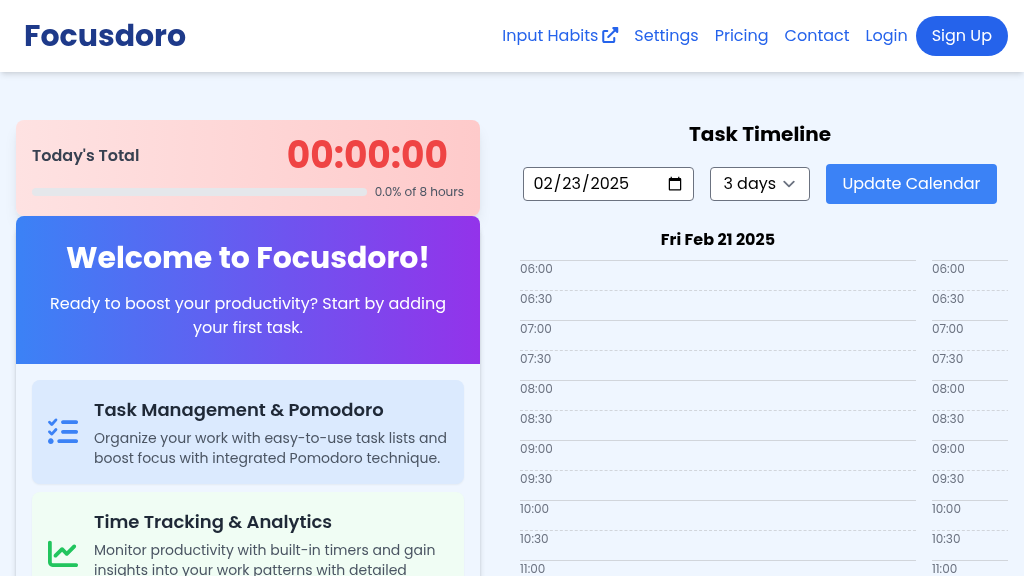
Focusdoro operates on the principles of the Pomodoro technique, which promotes time management through short, structured work intervals followed by brief breaks. Here's how it works:
- Task Input: Users input their tasks into the Focusdoro app, organizing them by priority and deadlines.
- Pomodoro Sessions: Each task is worked on in focused intervals, typically 25 minutes long, known as Pomodoros. After each session, users take a 5-minute break to recharge.
- Time Tracking: The app tracks the time spent on each task, allowing users to see how long they worked and where their time went.
- Analytics: Focusdoro provides detailed analytics on productivity, helping users identify their peak working times and areas for improvement.
- Smart Features: With AI-powered task categorization, Focusdoro intelligently organizes tasks based on user habits, optimizing workflow.
- Distraction Management: Built-in tools help users minimize distractions, keeping them focused on their work.
- Reminders: Users receive smart reminders about upcoming deadlines, ensuring they never miss an important task.
- Offline Capability: Focusdoro stores data locally, enabling users to work without an internet connection while keeping their information secure and accessible.
By integrating these elements, Focusdoro enhances productivity and helps users maintain focus, ultimately allowing them to achieve more in less time.
To get started with Focusdoro, simply follow these steps:
- Sign Up: Create an account on Focusdoro to access all features.
- Add Tasks: Input your tasks in the app, organizing them by priority and deadlines.
- Set Pomodoro Intervals: Choose your preferred Pomodoro time (default is 25 minutes) and start your first session.
- Track Progress: Use the built-in analytics to monitor your productivity and make improvements over time.
- Adjust as Needed: Modify your tasks and Pomodoro settings based on your workflow and preferences.
- Stay Focused: Use distraction elimination tools to maintain your focus during work sessions.
With these simple steps, you'll be on your way to maximizing your productivity with Focusdoro!
In summary, Focusdoro is a powerful productivity tool that integrates task management, habit tracking, and the Pomodoro technique to help users enhance their focus and productivity. With features like smart reminders, detailed analytics, and offline support, it is designed to meet the needs of various users looking to improve their work habits and achieve their goals effectively.
Features
Task Management
Easily organize and prioritize your tasks with our intuitive interface for enhanced productivity.
Pomodoro Timer
Utilize the Pomodoro technique to break work into intervals, boosting focus and efficiency.
Time Tracking
Monitor your productivity with built-in timers and gain insights through detailed analytics.
Smart Features
Enjoy local data storage and AI-powered task categorization for improved organization.
Progress Tracking
Visualize your productivity with comprehensive analytics and reports.
Distraction Elimination
Stay on track with integrated tools to minimize interruptions and enhance focus.
Use Cases
Academic Study Sessions
Students can use Focusdoro to manage their study time effectively, utilizing Pomodoro sessions to enhance concentration and retention. Ideal for tackling difficult subjects or preparing for exams.
Freelance Projects
Freelancers can organize their workload with Focusdoro, breaking tasks into manageable Pomodoro intervals to ensure productivity and meet client deadlines.
Corporate Team Management
Project managers can utilize Focusdoro for team task management, prioritizing projects and analyzing productivity across the team for better results.
Personal Productivity
Individuals seeking to enhance their personal productivity can use Focusdoro to track tasks, set goals, and analyze their performance over time.
Content Creation
Content creators can leverage Focusdoro to structure their writing sessions with focused Pomodoro intervals, allowing for high-quality output and creativity.
Remote Work
Remote workers can benefit from Focusdoro's offline capabilities, managing their tasks and maintaining productivity regardless of their internet access.
FAQs
Traffic(2025-07)
Monthly Traffic
Traffic Source
Top Keywords
| Keyword | Traffic | Volume | CPC |
|---|---|---|---|
| focus to do login | 80 | 10 | - |
| focus to do | 0 | 18520 | 1.14 |
| focus to-do | 0 | 13280 | - |
| focus todo | 0 | 4260 | 1.44 |
| pomodoro focus | 0 | 3310 | 1.50 |
Source Region
Whois
| Domain | focusdoro.com |
| Creation Date | 2026-09-03 04:38:48 |
| Last Updated | 2024-08-19 05:18:12 |
| Domain Status | clientdeleteprohibited, clientrenewprohibited, clienttransferprohibited, clientupdateprohibited, //icann.org/epp |
| Registrar | GoDaddy.com, LLC |
| Registrar IANA ID | 146 |
| Registrar URL | http://www.godaddy.com |
Featured Products

CrewAI

CoralAI

V0

Dify AI

Writer

Firstup

YesChat AI

HubSpot
Related Categories
Copy embed code
Alternative Products


Fabrile


Toolbit AI

Falcon LLM

Guidemaker

Dev Docs Translation for Apple


Bocca

CustomGpt


AskeyGeek

