


Bulk Rename Utility - Rename files effortlessly with AI assistance
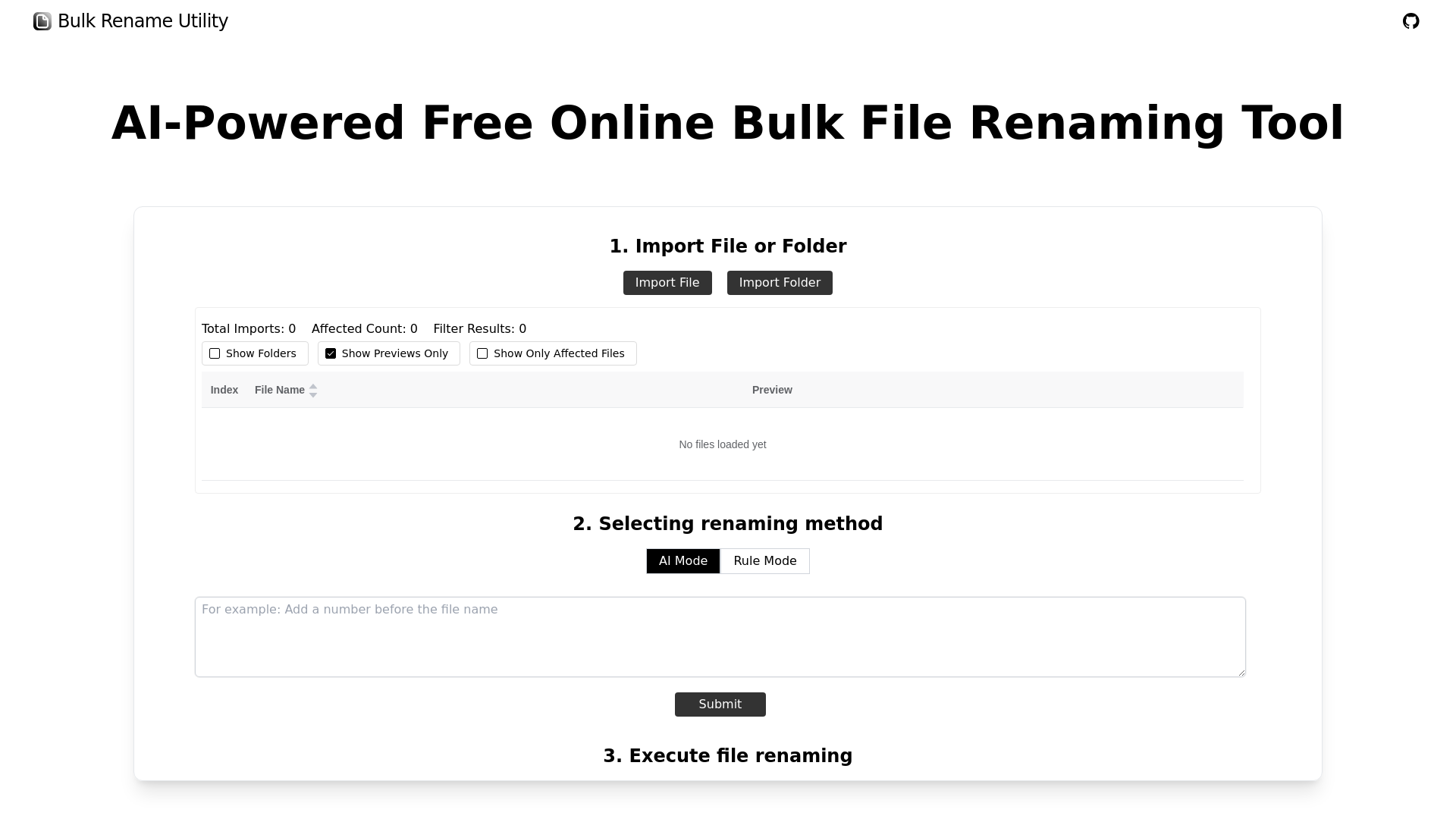
Bulk Rename Utility operates on two primary methods for renaming files: AI-powered and rule-based. Its AI feature allows users to describe their needs in simple language. The AI processes the input and automatically modifies the filenames accordingly, making it quick and intuitive. The rule-based operations are more flexible, allowing users to use various rules:
- Character Deletion/Replacement: Remove or substitute specific characters in file names.
- Adding/Inserting Characters: Insert characters at specified positions in the name.
- Sequence Padding: Automatically add sequential numbers to filenames to maintain organization.
- Regular Expression Replacements: Utilize regex for advanced matching and manipulation of file names.
- JavaScript Functions: For those skilled in coding, there’s the flexibility to write custom functions that can handle complex renaming tasks. This blend of AI power and customizable options caters to all kinds of user needs.
Getting started with Bulk Rename Utility is straightforward. Here’s how you can use it effectively:
-
Select Files or Folders: Open your web browser and go to the Bulk Rename Utility website. Start by selecting the files or folders you would like to rename. This web-based tool does not require any uploads—select them from your local directory.
-
Choose Renaming Method: You can opt for the AI Mode, where you simply describe what you need in natural language. The AI will interpret your instructions and modify your file names instantly. Alternatively, if you prefer a more manual approach, switch to Rule Mode, where a variety of customizable renaming rules are available. You can create specific rules based on your requirements.
-
Execute Renaming: Once you’ve made your selections and adjustments, click the Execute button. Your renamed files will update locally without needing to download anything. This makes it not only efficient but also secure.
With just a few simple steps, you can drastically simplify your file management tasks, all while assuring that your data remains private and protected.
In a world where file management can be overwhelming, Bulk Rename Utility emerges as an invaluable tool. Its dual approach combining AI prowess with manual customization offers users flexibility and efficiency. With no installation necessary, it simplifies renaming tasks while maintaining user privacy. Whether you're an experienced user looking for precision or someone needing assistance, Bulk Rename Utility has you covered. Enjoy organizing your files easily and securely, without any hassle!
Features
AI-Powered Renaming
Utilize AI to quickly rename files based on user-defined criteria, enhancing efficiency and convenience.
Rule-Based Options
Apply various customizable rules for advanced renaming tasks such as regex, character replacement, and padding.
No Installation Required
Being a web-based tool, it allows for immediate use without any downloads or installations.
Cross-Platform Compatibility
Efficiently handles files on both Windows and Mac systems via supported web browsers.
User-Friendly Interface
Designed with an intuitive layout that simplifies the renaming process for all users.
Privacy Assured
Operates locally without uploading files, ensuring user privacy and data security.
Use Cases
Professional Organizing
Streamline your file management in a corporate environment by renaming multiple files according to project names or dates.
Personal File Management
Easily organize personal documents and photos into meaningful names, improving accessibility and retrieval.
Batch Processing for Developers
Quickly rename numerous code files or project assets, maintaining consistent naming conventions across projects.
Media File Organization
Rename hundreds of images or video files based on metadata, ensuring each file is correctly titled for quick reference.
File Preparation for Uploads
Prepare files for online submissions by standardizing names to meet specific requirements or formats.
Archiving Important Documents
Efficiently rename bulk files for archival purposes while retaining essential information in the names.
FAQs
Traffic(2025-07)
Monthly Traffic
Traffic Source
Top Keywords
| Keyword | Traffic | Volume | CPC |
|---|---|---|---|
| bulk rename utility | 160 | 28600 | 1.27 |
| ai file renamer | 60 | 310 | - |
| rename ai | 40 | 290 | - |
| bulk change file names ai | 30 | 30 | - |
| bulk ai image rename | 20 | 50 | - |
Source Region
Whois
| Domain | bulk-rename-utility.com |
| Creation Date | 2026-01-08 07:15:36 |
| Last Updated | 2025-01-09 03:31:21 |
| Domain Status | clienttransferprohibited, //icann.org/epp |
| Registrar | 1API GmbH |
| Registrar IANA ID | 1387 |
| Registrar URL | http://www.1api.net |
Featured Products

BlurMe

Vogue AI

Nexty

Neural Frames

Siimple

FalcoCut

XXAI

Storydoc
Copy embed code

